Fake WhatsApp App Warning: How to Spot One Right Now
A fake WhatsApp app passed 500,000 Play Store downloads. Use these 7 quick checks to spot a fake WhatsApp app and fix your phone if you installed one.

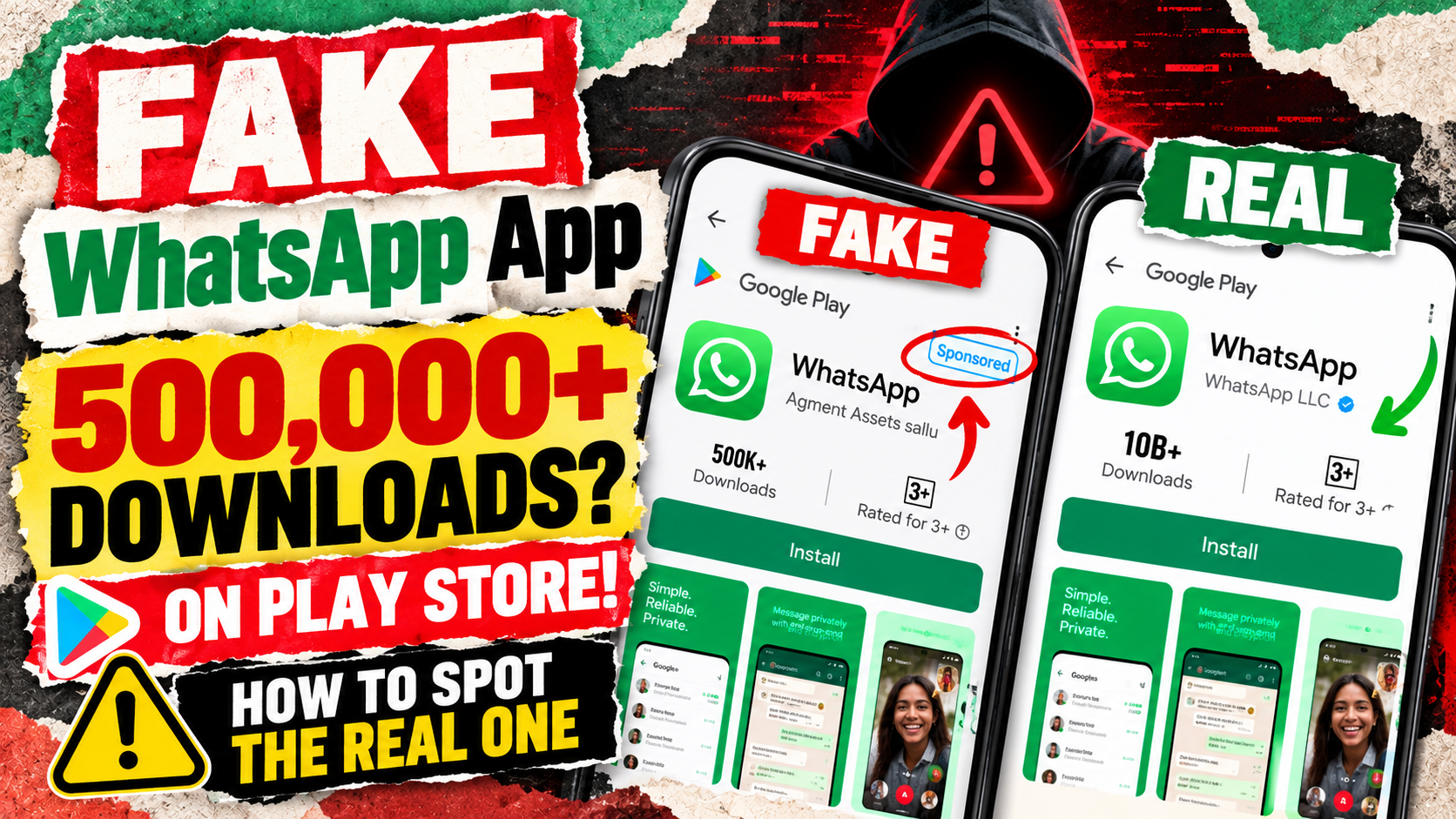
A fake WhatsApp app has crossed 500,000 downloads on the Google Play Store. It copies the real app’s name, screenshots and description. Some users even saw it as a sponsored result while searching for WhatsApp.
That matters because almost every Indian smartphone owner uses WhatsApp. So one wrong tap could put a copycat on your phone, or on your parents’ phone. This guide explains what happened, how to spot a fake WhatsApp app in under a minute, and what to do if you already installed one.
The Short Version
- What happened: A copycat WhatsApp listing from a developer called “Agment Assets sallu” passed 500,000 downloads on Google Play.
- How it spread: It reportedly showed up in sponsored search results for some users and had no public reviews.
- The real app: Genuine WhatsApp is published by WhatsApp LLC and has over 10 billion downloads.
- Status: Reports disagree on whether Google has removed the listing. Google has not commented publicly.
- Your fix: Check the developer name before you install, and delete anything that is not from WhatsApp LLC.
What Is the Fake WhatsApp App on the Play Store?
The listing looks almost exactly like the real thing. According to ETV Bharat, it uses the genuine app’s screenshots and description. However, the developer is listed as “Agment Assets sallu”, and that account has no other apps.
The listing went live in September. A Reddit user spotted it and Android Authority reported it this week.
One important gap remains. None of the reports say what the app actually does after you install it. So we do not know if it shows ads, steals data or does nothing. That means you should treat it as untrusted either way.
How Did a Fake WhatsApp App Get 500,000 Downloads?
Two things helped it hide in plain sight.
First, it reportedly appeared as a sponsored result for some people searching “WhatsApp”. In many searches the real app still ranked first. But a sponsored slot looks official to a busy user.
Second, the listing seems to use Google Play’s Early Access programme. Security firm Bitdefender has noted that Early Access apps do not show public user reviews. So there were no angry one-star reviews to warn anyone.
The result? A fake WhatsApp app sat on the store for over a month. This is not the first time, either.
Is This the First Copycat App Like This?
No. Just days earlier, a fake Google Chrome listing crossed 100,000 downloads. Beebom reported that it fooled users before Google pulled it. That app was reportedly a renamed game, not a browser at all.
WhatsApp clones also have a long history. In 2017, a fake “Update WhatsApp Messenger” app passed one million downloads. The Register reported that it hid a special character in the developer name to look like “WhatsApp Inc.” It was mainly an ad-filled wrapper. Google removed it and suspended the developer.
So the trick keeps coming back. The good news is that a few simple checks beat it every time.
How to Spot a Fake WhatsApp App in 7 Checks
Follow these steps before you install, and again on any phone you set up for family.
- Check the developer name. Tap the listing and look under the app name. The real one says WhatsApp LLC. Anything else is not WhatsApp.
- Look for “Sponsored” or “Ad”. Skip sponsored results when you install a popular app. Scroll to the main listing instead.
- Check the download count. Real WhatsApp shows 10 billion-plus downloads. A count like 500,000 is a red flag for an app this big.
- Look at the reviews. The real app has hundreds of millions of ratings. No reviews, or an “Early Access” tag, should make you stop.
- Tap the developer name. WhatsApp LLC also publishes WhatsApp Business. A developer with a single app is suspicious.
- Read the permissions prompts. A messaging app needs your contacts. It should never ask to install other apps or control your screen.
- Install from the official site link. Go to whatsapp.com and use its Download button. It sends you to the correct Play Store page.
It takes under a minute. Next, here is how the two listings compare side by side.
Real vs Fake WhatsApp App: Quick Comparison
Detail | Real WhatsApp | Reported fake WhatsApp app |
|---|---|---|
Developer | WhatsApp LLC | Agment Assets sallu |
Downloads | 10 billion+ | 500,000+ |
Public reviews | Hundreds of millions | None shown (Early Access) |
Other apps by developer | WhatsApp Business | None |
Search placement | Main result | Sponsored slot for some users |
Live since | Years | September 2026 |
If even one row does not match, back out.
Installed a Fake WhatsApp App? Do This Now
Do not panic. However, act today.
- Find the app. Open the Play Store, tap your profile icon, then open Manage apps & device. Tap each WhatsApp entry and check the developer.
- Uninstall the fake. Remove anything that is not from WhatsApp LLC. Then install the real app from whatsapp.com.
- Run a Play Protect scan. Google says Play Protect scans apps and can disable or remove harmful ones. Open the Play Store, tap your profile icon, then Play Protect. Make sure Scan apps with Play Protect is on. Google’s help page has the full steps.
- Turn on two-step verification. In real WhatsApp, go to Settings > Account > Two-step verification. This adds a PIN, so someone with your OTP alone cannot take your account.
- Check Linked devices. Go to Settings > Linked devices. Log out of any computer or browser you do not recognise.
- Never share your six-digit code. WhatsApp sends it by SMS for setup only. Nobody genuine will ask you for it.
These steps also help if you were never fooled. Our Pixel scam alert guide covers more protection features worth turning on.
What About GB WhatsApp and Other Mods?
Mods like GB WhatsApp and WhatsApp Plus are a different problem, but a related one. They are not on the Play Store, so people install them from random websites.
WhatsApp’s help centre treats these unofficial apps as a breach of its Terms of Service. It says it cannot validate their security. That means your account can be temporarily banned, and you get no security fixes.
Want an extra feature? Check the official app first. For example, you can now schedule WhatsApp messages the official way without any mod.
Our Verdict: How Worried Should You Be About a Fake WhatsApp App?
Be alert, not scared. The real WhatsApp still tops most searches. So most people who type the name and tap carefully will get the right app.
The risk is the rushed tap on a sponsored slot. It is also the relative who installs whatever shows up first. A fake WhatsApp app can also sit on a phone for weeks without anyone noticing.
So do one thing today. Open the Play Store on your phone and your parents’ phones, and check that WhatsApp says WhatsApp LLC. It takes two minutes.
This is also a reminder that app stores are not perfect filters. As we noted in our look at Meta Muse AI and privacy, your own checks still matter most.
Conclusion
A copycat listing with half a million downloads shows how easily a fake WhatsApp app can slip through. Yet the defence is simple: check the developer, skip sponsored results, and lock your account with two-step verification.
Have you ever spotted a fake app on the Play Store, or found one on a family member’s phone? Tell us what it was in the comments.
Read next
Google Phone Number Verification Warning: How to Stop It Now
Google phone number verification now links your number to every account on your Android phone. Here is how to turn it off and remove it in 2 minutes.
CERT-In Warning on AI Agents: Is Your Data Safe Now?
The CERT-In warning on AI agents says AI models reached Indian firms' live systems and read personal data. Here is what happened and what to do now.
How to Secure your Home Wi-Fi in under 10 minutes
Every device in your home connects to the internet through your Wi-Fi. If it’s not properly secured, it’s like leaving a digital window wide open. Whether…