
Codex Micro : Why OpenAI’s First Hardware Feels So Strange

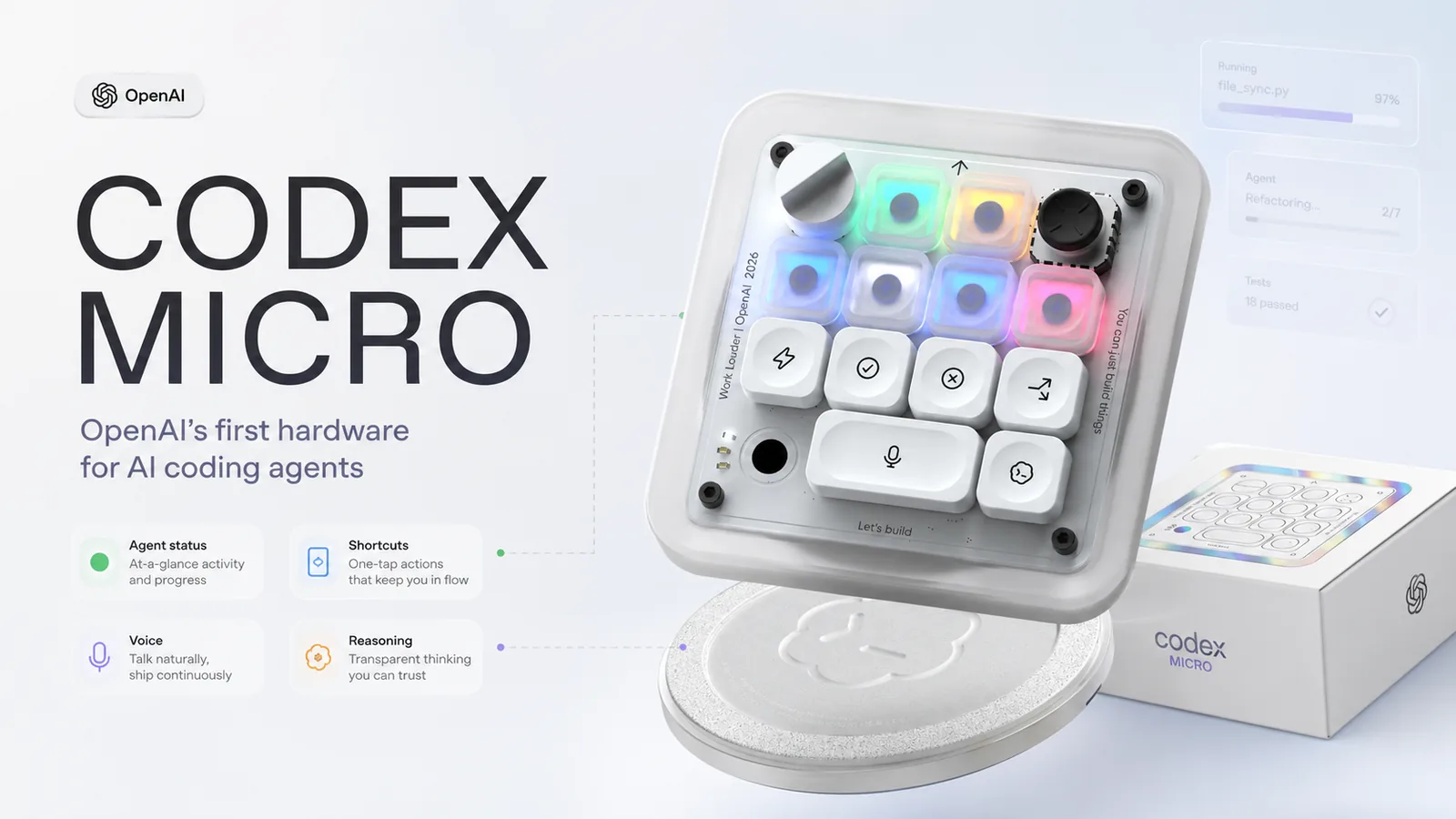
It is not the mysterious Jony Ive AI device people have been waiting for.
OpenAI Made a small $230 keyboard-style controller called Codex Micro.
At first, that sounds strange. Maybe even underwhelming.
Why would one of the most powerful AI companies in the world make a tiny keyboard?
But the answer is more interesting than the device itself.
Codex Micro is not really about typing. It is about controlling AI coding agents. It is built for people who use OpenAI Codex, the company’s software development agent, and want physical controls for managing AI tasks while they work. OpenAI describes Codex Micro as a Work Louder collaboration that brings your “agentic workspace” within reach, with Agent Keys that light up based on live Codex status.
That makes this product feel strange for a reason.
It is not built for how most people use AI today.
What Is Codex Micro?
Codex Micro is a compact macropad made by OpenAI in collaboration with Work Louder, a company known for creator-focused shortcut keyboards.
Think of it as a small control pad that sits beside your normal keyboard.
It is not meant to replace your laptop keyboard. It is meant to give Codex users faster physical access to AI coding-agent controls.
OpenAI lists Codex Micro at $230 and says it includes extra Codex icon keycaps. The device is designed around Agent Keys that show live RGB status from Codex, so you can see whether an agent is thinking, running, waiting, or ready before switching chats.
Here is the simple version:
Feature | What it means |
|---|---|
Mini keyboard/macropad | A small physical shortcut device |
Agent Keys | Buttons connected to Codex agent threads |
RGB feedback | Lights show what an AI agent is doing |
Shortcuts | Faster access to Codex actions |
Dial | Can adjust reasoning level or other settings |
Joystick | Extra control for navigation or mapped actions |
Voice prompt key | Quick way to speak instructions using your computer mic |
So yes, it looks like a tiny keyboard.
But OpenAI is presenting it more like a control panel for AI agents.
Why Does Codex Micro Feel So Strange?
It is small and niche.
It is expensive for its size.
And it is clearly made for a specific type of user.
That is why the product feels odd at first glance.
But that does not automatically make it useless.
It feels strange because it solves a problem most people do not yet have.
Most people still use AI like a chat app. They open ChatGPT, type a prompt, get an answer, and move on.
Codex Micro is built for something else.
It is built for people who may have multiple AI coding agents running tasks in the background. These agents may be thinking, editing code, waiting for feedback, or finishing work while the developer is doing something else.
That is a very different workflow.
What Codex Micro Actually Does
Codex Micro is designed around the idea that AI coding work is becoming more active.
Instead of only asking one chatbot a question, developers may start several agent tasks and monitor them at the same time.
Business Insider describes Codex Micro as “a joystick for navigation and a dial for adjusting an agent’s reasoning level.”
It is even reported to have voice dictation through your computer’s mic and mappable controls.
That gives us a clearer picture of what this thing is trying to do.
Codex Micro feature | Why it matters |
|---|---|
Agent status lights | You can see if an AI task is thinking, waiting, ready, or stuck |
Agent switching | Helps you move between multiple Codex threads |
Shortcut keys | Reduces repeated clicking and menu actions |
Reasoning dial | Lets you adjust how deeply the agent works on a task |
Voice prompt key | Makes it faster to give spoken instructions |
Joystick | Can be mapped for navigation or workflow controls |
If you have several AI agents working at once, you need to know what each one is doing. A visual signal can reduce the need to keep checking different windows.
That is where Codex Micro starts to make sense. It is more like a dashboard for AI coding agents.
Why Did OpenAI Make a Keyboard for AI Agents?
The better question is:
Why do AI agents need new controls?
A normal coding workflow is mostly direct. You write code. Run it. You fix errors. Search for help. You repeat.
AI changed that.
First, developers started using chatbots to explain code, write functions, and debug errors.
Now, coding agents are pushing the workflow further. Instead of only giving suggestions, they can take tasks, make changes, and work more independently.
That changes the developer’s role.
You may be:
- assigning tasks
- reviewing changes
- correcting mistakes
- switching between agents
- deciding when deeper reasoning is needed
- accepting or rejecting generated code
This is why physical controls might matter for some power users.
Video editors use control surfaces.
Music producers use MIDI controllers.
Streamers use Stream Decks.
Designers use shortcut pads.
Codex Micro is trying to bring that same idea to AI coding.
Developers Are Becoming AI Managers
A recent paper analyzing Codex usage found that agentic AI usage grew quickly in early 2026, with active users growing more than fivefold in the first half of the year. The paper also described a shift toward agentic tooling, especially inside organizations.
That makes Codex Micro less random.
It is not for every developer.
But it is built around a real shift: software work may become more supervisory.
That does not remove the need for skill. In fact, it may make judgment more important.
You still need to know what to ask, check the output, understand the code and catch mistakes.
AI agents can work faster than humans in some areas. But humans still need to decide what good work looks like.
Codex Micro vs a Normal Macropad
A fair question is:
Couldn’t you do this with a normal macropad?
A normal macropad can already handle shortcuts. You can map keys to open apps, run commands, paste prompts, launch scripts, or trigger automations.
But Codex Micro is more specific.
Feature | Normal macropad | Codex Micro |
|---|---|---|
Keyboard shortcuts | Yes | Yes |
RGB lighting | Often yes | Yes |
Custom key mapping | Yes | Yes |
Codex agent status | No native support | Yes |
Agent thread switching | No native support | Yes |
Codex-specific icons | No | Yes |
Reasoning controls | Usually manual | Built around Codex workflow |
Broad usefulness | High | Mostly useful for Codex users |
That is the tradeoff.
A normal macropad is more flexible. Codex Micro is more specialized.
If you do not use Codex heavily, a normal shortcut pad may be more useful. But if Codex becomes central to your coding workflow, live agent status and dedicated controls could save time.
Is Codex Micro Worth $230?
For most people, probably not.
That is the honest answer.
Codex Micro is a niche device. Definitely not a must-buy gadget for casual ChatGPT users. It is not a general AI keyboard for everyone.
It may be worth considering if:
- you use Codex every day
- run multiple AI coding agents
- like physical controls
- want live agent status lights
- you work professionally with AI coding tools
- shortcuts genuinely save you time
- you already spend money on productivity hardware
And probably not if:
- you only use ChatGPT casually
- you do not code
- you are buying it only because it says OpenAI
The price is also part of the debate.
A $230 macropad is not cheap. Many people will look at it and say it is just an expensive shortcut keyboard.
That criticism is fair.
Codex Micro is not expensive because it has many keys. It is expensive because it is trying to sell a workflow.
And that workflow only makes sense for a small group of users right now.
Why People Are Skeptical
Some users question the price. Others point out that software shortcuts can already do many things. Some see it as a branded version of hardware Work Louder already knows how to make.
Codex Micro is not trying to become the next iPhone.
It is not even trying to become the next popular keyboard.
It is a specialized tool for a specialized audience.
Why Codex Micro Still Matters
Codex Micro matters less as a product and more as a signal.
It shows that AI companies are not only thinking about models. They are also thinking about interfaces.
As AI agents become more capable, the main problem may not be only intelligence. It may be control.
How to know what an agent is doing?
Can you pause it?
What about switching between tasks?
How do you give quick feedback?
Can you better prevent mistakes?
How do you manage several AI workers at once?
These questions are not solved by a smarter model alone.
They need better design.
Codex Micro is one possible answer. Maybe not the final answer. Maybe not even the best answer.
But it points to a real issue.
How do you control AI when it stops waiting for every prompt and starts working in parallel?
This Is Not OpenAI’s Jony Ive Device
It is important to separate Codex Micro from OpenAI’s larger consumer hardware plans.
Codex Micro is a Work Louder collaboration. It is developer-focused and not a screenless AI companion. It is clearly not the mysterious mass-market AI device people have been discussing.
What Codex Micro Says About the Future of Work
Codex Micro hints at a future where AI work becomes more task-based and more parallel.
You may not always use AI by typing one prompt into one chat window. But use it more like a team of tools than a single assistant.
That does not mean everyone needs hardware.
Many people will prefer software controls. A well-designed app can do a lot. A normal keyboard shortcut can still be enough for most users.
Everyone might not need it but AI work may need new interfaces.
Final Takeaway
Codex Micro is a niche controller for Codex power users who work with AI coding agents.
AI coding is changing from simple chatbot help to agent-based work. Developers may soon spend more time directing, reviewing, and managing AI agents. When that happens, better controls may matter.
Codex Micro may not become a mainstream gadget. But it does reveal something important.
AI work is becoming more active, more parallel, and harder to manage with only chat windows.
That is why OpenAI’s first hardware feels strange. It is built for a workflow that is still new.
Read next

The Best Laptops Under Rs 50,000: How to Get 16GB RAM for Less
We checked live prices on laptops under Rs 50,000. One 16GB MSI costs Rs 43,219, less than its 8GB twin. Here is what to buy and what to skip.

All 9 RTX Spark Laptops Ranked: Best and Worst Value
We ranked all 9 RTX Spark laptops on price, battery and game support. Buy the ASUS ProArt, skip the Dell XPS 16, and gamers should wait.

Apple October 28 Event: Will You Pay More Money Now?
The Apple October 28 event is confirmed, with a touchscreen MacBook Pro tipped. See the IST time, India prices and whether to buy a Mac now or wait.